Build React app in minutes with AI
Topics
Why can't I use an import statement outside a module?
How do I use an import statement in TypeScript with Jest?
Can I mix import and require in Node.js?
How do I import a require-style module using import?
Fixing the “cannot use import statement outside a module jest” error requires proper Jest and Babel or ts-jest setup. This guide walks through configurations, file handling, and module alignment so your tests run without syntax errors.
"cannot use import statement outside a module jest" — if this error pops up during testing, it can stop everything in its tracks. It’s usually not your syntax at fault, but a mismatch between ES modules in your code and how Jest processes them. This guide explains why it happens and how to fix it in JavaScript, TypeScript, and popular frameworks.
This error reflects a mismatch between your code’s use of import statements and how Jest interprets modules. Jest defaults to CommonJS. You have valid JS modules using ES modules, but Jest sees them as plain JavaScript. That mismatch triggers “syntaxerror: cannot use import” or “unexpected token”. You use create-react-app or plain js setups that rely on import statements, yet the jest config doesn’t allow them in JS files outside a module.
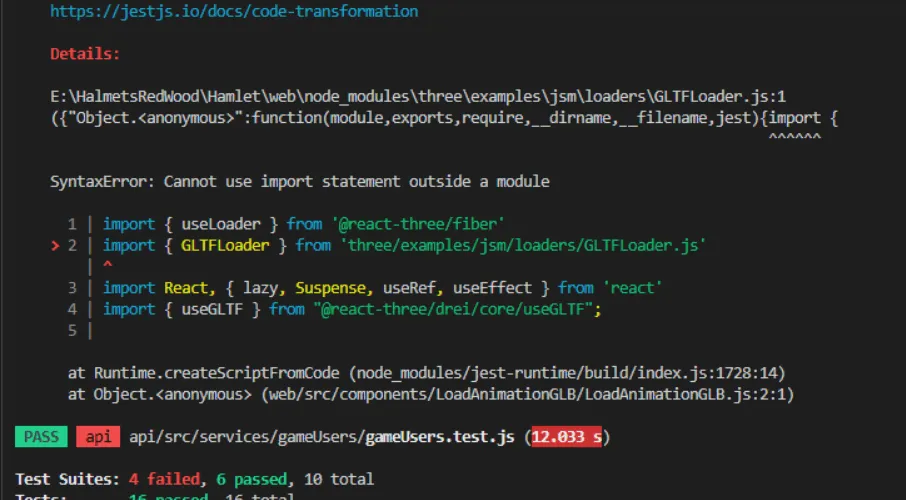
Details:
package.json.This error usually means that you are trying to import a file which Jest cannot parse, e.g. it's not plain JavaScript. By default, if Jest sees a Babel config, it will use that to transform your files, ignoring "node_modules". — Check out the full discussion on GitHub
Here’s a Mermaid chart showing the potential reasons for the "cannot use import statement outside a module" error in Jest:
You need module alignment to ensure the import works correctly. That means telling Jest how to handle import statements, ECMAScript modules, custom transformations, file extensions, binary assets, non-JS modules, and TS files if used.
First, introduce proper or .
This part requires you to allow to use statement outside modules. Use a babel configuration:
Example :
This ensures Jest sees valid JS and transpiles ECMAScript modules. Without this, tests fail with a syntax error because they cannot use import outside a module.
Then set up :
That box Jest supports Babel kicks in. Now import statements work fine. Without this transform, you’ll run into the same error when running Jest, unable to parse import statements. The babel jest transform compiles modules to CommonJS before Jest loads them.
If you use TypeScript, offers custom transformations tailored for files.
Install dependencies:
Create :
This setup handles import statements inside files, transforms code to valid , and ensures the test suite works. Without or proper babel config, import statements in files will trigger “cannot use import statement outside a module jest” error message—the same error repeats until you add .
Even with , you may face the error. Causes include:
Jest needs to know how to handle files, files, and other resources like CSS, images, or binary assets. Without config, you get “unexpected token jest failed” when importing such files. That’s because your code uses import statements for non-JS modules, which Jest doesn’t process.
In , extend:
Here, helps Jest mock styles. A returns a placeholder for images or binary assets. Without this, tests blow up due to import statements in non-JS modules.
This setup allows import statement usage across modules, files, React DOM imports, and even assets. No more error: “cannot use import statement outside a module jest”.
Streamline your development workflow by automating repetitive tasks with Rocket.new. Start building smarter projects faster.
Even with configuration, the same error may appear due to:
If Jest sees an import statement outside a module—with no transformation—it throws that error.
Import statements work properly when:
That alignment ensures import statement outside a module jest errors disappear.
It’s possible to mix import and require in the same project—but only where supported.
This hybrid style may cause unexpected token jest failed errors if the config doesn’t unify syntax.
If you want to import require-based modules using import:
Transformed by Babel or , this works fine. Jest sees valid js. Without transform, Jest throws “cannot use import statement outside a module jest error”.
Create React App (CRA) already supports ES modules with Babel. But Jest inside CRA sometimes encounters files outside the src.
When box jest supports Babel inside CRA, you still need to adjust file extensions, moduleNameMapper, and transform for assets.
| Scenario | Cause |
|---|---|
| import in JS file without Babel | Jest sees import—syntaxerror |
| ESM dependency in node_modules without transform | import in non js modules—unexpected token |
| Ts files outside transform patterns | import in ts files not transformed |
| Importing CSS or images | non js modules—jest fails |
| No type: module or .mjs in package.json | import without proper ESM support |
By addressing each scenario, you avoid “cannot use import statement outside a module jest” pain points.
When you run npm test, Jest transforms ts files, handles imports, and runs tests without “cannot use import statement outside a module jest” or “unexpected token jest failed”.
You now see how mismatched module formats lead to the “cannot use import statement outside a module jest” error. You understand how babel config, , and proper transform patterns resolve it. You learned about file extensions, moduleNameMapper, and mixing import with require.
This error highlights how module systems and test runners misunderstand each other without proper configuration. You worked through aligning import statements, configuring Babel or , and handling assets. That insight gives you a stronger foundation for maintaining test suites in modern JavaScript environments. Feel free to revisit steps if tests fail, and know that once transforms properly align, your tests will run without breaking on import statements.
You can now:
Try running your test suite after applying these steps. You should no longer hit “statement outside a module”, “unexpected token jest failed”, or “syntaxerror cannot use import’. Fixes revolve around consistent module handling, config options, and ensuring that all files are transformed.
babel configts-jestimportbabel.config.js.babelrcautocommonjs@babel/preset-typescriptbox jestbabelbabel.config.jsjest.config.jsts-jesttsjest.config.jstsjsts-jesttsts-jestts-jest.jstsconfig.jsonts-jestreact router domjstsjest.config.jsidentity-obj-proxyfileMock.jsjstspackage.json.mjsjest configjsts-jesttsjstsconfig.jsonJest configts-jest.ts.jsjs.jsts-jestts-jest.js.jsx.ts.tsx.mjsadd.tsadd.test.tsbabel.config.jsjest.config.jsts-jestbabel-jestfileMock.jsts-jestts-jestjstsbabel.config.jstsmoduleNameMapperpackage.jsonmodule.exports = {
presets: [
["@babel/preset-env", { targets: { node: "current" }, modules: "auto" }],
"@babel/preset-typescript"
],
};
module.exports = {
  transform: {
    "^.+\\.(js|jsx|ts|tsx)$": "babel-jest"
  },
  moduleFileExtensions: ["js", "jsx", "ts", "tsx", "json", "node"],
};
module.exports = {
  preset: "ts-jest",
  testEnvironment: "node",
  moduleFileExtensions: ["ts", "tsx", "js", "jsx", "json", "node"],
  transform: {
    "^.+\\.(ts|tsx)$": "ts-jest"
  },
};
module.exports = {
  // existing config...
  moduleNameMapper: {
    "\\.(css|less|scss)$": "identity-obj-proxy",
    "\\.(png|jpg|svg)$": "<rootDir>/__mocks__/fileMock.js"
  },
  transform: {
    "^.+\\.(js|jsx|ts|tsx)$": "babel-jest"
  },
};
// jest.config.js
module.exports = {
  transform: {
    "^.+\\.(js|jsx|ts|tsx)$": "babel-jest"
  },
  moduleFileExtensions: ["js", "jsx", "ts", "tsx", "json", "node"],
  moduleNameMapper: {
    "\\.(css|scss)$": "identity-obj-proxy",
    "\\.(png|jpg|svg)$": "<rootDir>/__mocks__/fileMock.js"
  },
  testEnvironment: "jsdom",
};
// babel.config.js
module.exports = {
  presets: [
    ["@babel/preset-env", { targets: { node: "current" }, modules: "auto" }],
    "@babel/preset-typescript",
    "@babel/preset-react"
  ],
};
import pkg from 'some-cjs';
const { foo } = pkg;
npm install --save-dev ts-jest @types/jest typescript
project/
├── babel.config.js
├── jest.config.js
├── package.json
├── src/
│   ├── add.ts
│   └── add.test.ts
└── __mocks__/
    └── fileMock.js