
Build 10x products in minutes by chatting with AI - beyond just a prototype.
Topics
Is vibe coding better than no code?
Do I need coding knowledge for vibe coding?
Can no code tools build real apps?
What is the future of coding vs no code?
Which approach fits your workflow better? Vibe coding offers AI-assisted code generation with flexibility, while no-code tools rely on visual builders for faster creation without manual programming.
Vibe coding or no-code tools, which one should you pick?
If you want flexibility and real code, vibe coding works better. If you want speed without writing code, no-code tools are the easy start. Both solve different problems, and the choice depends on your goals.
According to a Statista report , the low-code and no-code market is expected to reach $65 billion by 2027. This clearly shows how fast the tech world is shifting toward these tools.
This blog will help you understand both options clearly so you can pick the right tool for your needs.
So, vibe coding is all about generating real code using natural language. You describe what you want, and AI handles the code generation. Tools like Claude code or other AI assistants help you skip manual coding while still producing real software.
Instead of writing code line by line, you guide the system using natural language prompts . The result is AI-generated code that you can edit, scale, and deploy.
That’s the key difference in coding vs no code. Vibe coding still gives you real code, not just visual outputs.
This is where vibe coding shines. You get flexibility without fully depending on manual coding.
Now, let’s talk about no-code.
No code platforms focus on building apps using drag-and-drop interfaces. You don’t need coding knowledge. You use visual builder tools, drag and drop builders, and visual interfaces to create apps.
No code development is simple. You pick elements, connect workflows, and your app is ready.
No code wins when speed matters. Especially for non-technical users.
Before choosing between these two, it helps to understand what really separates them. Many people compare features, but the real difference is much simpler and more practical.
Here’s the critical distinction.
Vibe coding vs no code is not just about tools. It’s about control vs simplicity.
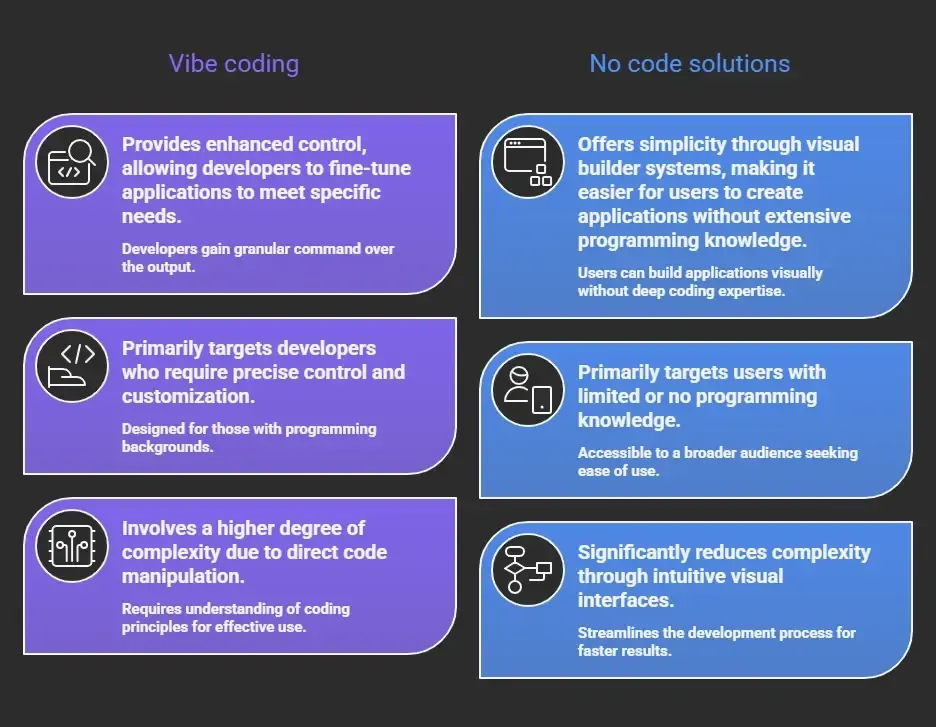
In coding vs no code discussions, this difference always stands out.
If you value flexibility and deeper customization, vibe coding makes more sense. If you want quick results with less effort, no code is the better pick.
Before getting into deeper details, a quick comparison helps you see the difference clearly. This makes coding vs no code decisions much easier, especially if you’re just starting out.
| Feature | Vibe Coding | No Code |
|---|---|---|
| Coding required | Minimal but present | No coding required |
| Output | Real code | Platform-based apps |
| Flexibility | High with custom logic | Limited |
| Learning curve | Medium | Low |
| Speed | Fast with AI generation | Very fast with drag and drop |
| Control | More control | Less control |
| Use cases | Web apps, internal tools, complex logic | Landing page, mobile apps, marketing sites |
This table makes vibe coding easier to understand.
If you want clarity at a glance, this comparison gives you a simple way to decide based on your needs and project goals.
So, when should you pick vibe coding? Vibe coding works well when you need:
For example, if you are building a client portal or enterprise applications, vibe coding platforms make more sense. You can also handle data modeling and business logic properly.
If you’re looking for speed and simplicity, this is where no-code really stands out. It’s built for people who want results quickly without getting into coding or complex development steps.
Now, let’s flip it.
No code tools are great when:
No code start is very easy. You just open a visual builder and begin.
If your goal is to launch fast and keep things simple, no-code tools are a solid choice without worrying about coding required or technical setup.
To really understand coding vs. no-code, it helps to look at how things work in actual projects. This is where the differences become clear and practical.
Let’s make this real.
Think about building business tools.
That’s where vibe coding vs becomes interesting.
This is why many it teams combine both approaches.
In real-world projects, the best results often come from mixing both, using no code for speed and vibe coding for flexibility when things grow.
Well, there’s also low code.
Low code sits between vibe coding and no code. A low-code platform gives you a visual builder plus some manual coding options.
Low code helps when:
Low code is often used in enterprise applications where speed and flexibility both matter.
Let’s talk about effort.
Even though vibe coding reduces manual coding, you still need some coding knowledge to manage generated code.
So in coding vs no code discussions, learning curve matters a lot.
Here’s something real from developers:
“No-code tools are great for MVPs, but once you scale, you’ll need more control. That’s where code or AI-assisted coding comes in.”- Reddit
Next, let’s talk about vibe coding tools. Tools using AI capabilities now support:
Platforms like Claude Code are pushing this space forward. Vibe coding works best when AI features are combined with developer control.
Before you decide, it’s important to look at the downsides too. Every approach has trade-offs, and understanding them helps you make better coding vs no code decisions.
Let’s be honest.
This is where coding vs no code decisions get tricky.
If you know these limits early, you can plan better and choose the approach that fits your project without running into surprises later.
Rocket.new is a vibe solutioning platform that combines AI generation with structured building. It focuses on helping users create real software using natural language while still giving flexibility and control.
In the context of coding vs no code, Rocket.new stands right in the middle making it easier to switch between simplicity and deeper customization when needed.
So, where does Rocket.new fit in this vibe coding vs no code discussion?
Rocket.new connects both worlds. It blends AI generation with structured building tools. You get a mix of vibe coding platforms and no code platforms in one place.
1. Internal Tools
You can build internal tools quickly using AI generation and visual interfaces. This helps it teams move faster.
2. Client Portal
Create a client portal with custom logic and backend logic. This combines vibe coding and no code.
3. Marketing Sites
Build marketing sites using drag and drop and AI generated design.
4. Web Apps
Develop web apps with real code while keeping speed high.
Rocket.new acts as the right tool when you want both speed and control, without choosing strictly between vibe coding and no code.
So, what’s the final call? The problem is simple. People often get stuck between speed and control. No code is fast and easy, but it comes with limits. Vibe coding gives flexibility and real code, but it needs more effort and some coding knowledge.
The solution is to use both wisely. Start with no code tools for quick builds and rapid prototyping. Then switch to vibe coding when you need custom logic and scalability. The main takeaway is clear. The best choice depends on your project context, and that’s the real answer to vibe coding vs no code tools comparison.